Home ❯ Offline EDB File Recovery

Offline EDB File Recovery

Recover offline EDB files and save them on Live Exchange, PST, Office 365, and Outlook Profile.

  • Recover offline EDB emails, attachments, contacts, calendars, tasks, notes, etc.
  • Recover data from corrupted, inaccessible, or orphaned EDB files.
  • Get all permanently deleted items back in original structure.
  • Offers a detailed preview of EDB file with attachments before saving.
  • Recover single or multiple user mailboxes in single operation cycle.
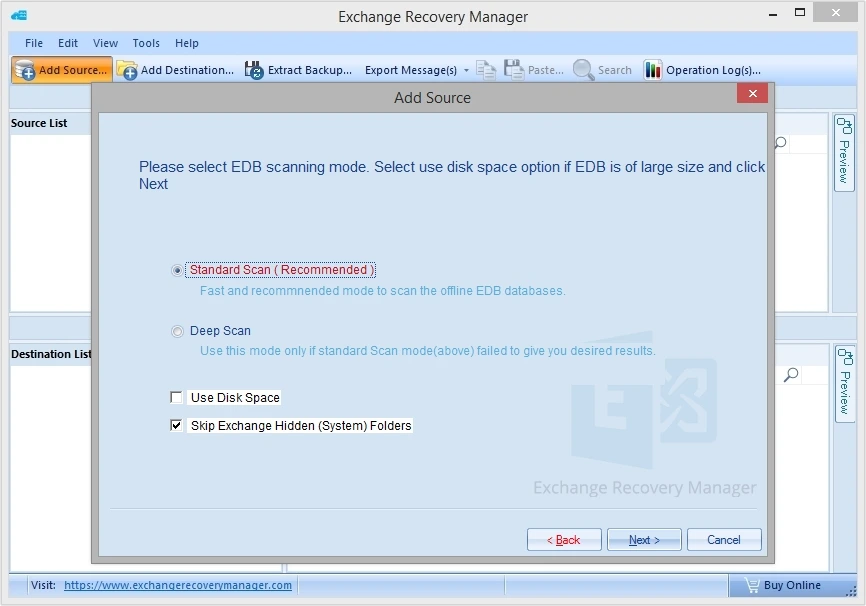
  • Dual scanning mode, i.e., Standard Scan and Deep Scan for quick data recovery.
  • Smart filter options like Date range filter, export duplicate items, items type, etc.
  • Get in-depth operational log report to track completed processes.
  • Compatible with all EDB files regardless of Exchange versions.
Standard License
$599 $399
Buy Now
Professional License
$999 $799
Buy Now
Client Testimonials

Key Benefits of Offline EDB File Recovery Tool

Recover corrupt or damaged EDB

Recover corrupt and inaccessible EDB data

Add corrupted, damaged, or inaccessible EDB files and recover all mailbox data securely. Scan EDB file corruption with Standard Scan and Deep Scan mode to recover archived mailboxes, shared mailboxes, private mailboxes and deleted items.

Multiple saving options

Multiple saving options

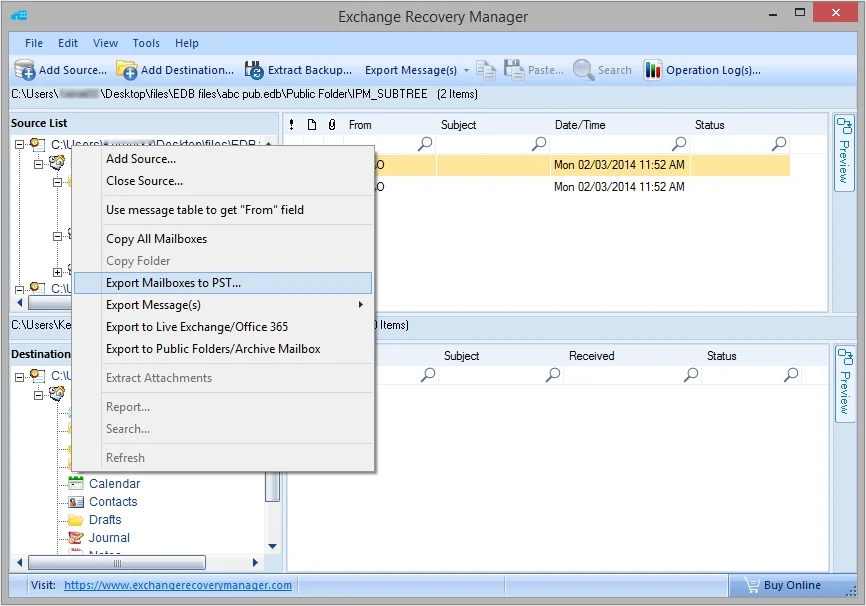
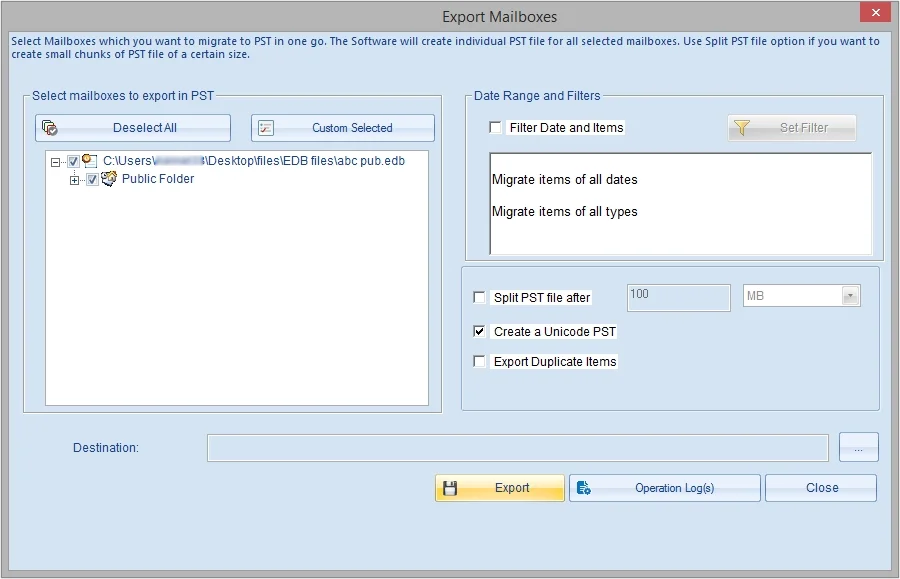
The tool offers multiple options to save data from source to destination, like Drag-Drop, Copy-Paste, Export Mailboxes to PST, Export Message(s), Export to Live Exchange or Office 365, Export to Public Folders or Archive Mailbox, and Extract Attachments.

Batch offline EDB file recovery

Batch offline EDB file recovery

The Offline EDB File Recovery Tool is designed to perform bulk EDB file recovery without any interruptions or data loss. Add any number of EDB files as source regardless of their size and experience a smooth process.

Export selective EDB data in single files

Export selective EDB data in single files

With this advanced tool, you can recover and export selective EDB data in single file formats like MSG, EML, RTF, HTML, Text, etc. Just right-click on the mailbox or choose Export Message(s) option and select any format that you want.

Detailed preview of Offline EDB files

Detailed preview of Offline EDB files

Get a detailed preview of recovered Exchange mailbox data from the source in a hierarchical structure. View and read entire message including deleted items, attachments, and other items for 100% accurate recovery of data.

Detailed operation log

Detailed operation log(s)

Keep a track of recovered data with operation log(s) feature such as Items exported from Right Pane, Items exported using Search, Folder exported, Single mailbox exported, and Multiple mailboxes exported.

Search within source mailbox

Search within source mailbox

Look for specific messages using keywords from General (Subject, Body, From, To, CC, BCC), Mail Properties (Category, Class, Importance, Read Status, Size), Date (Msg Date), and Attachments (Attachment Name, Type, Body, Size).

Generate detailed EDB file recovery report

Generate detailed EDB file recovery report

Users can generate a comprehensive report to validate data stored in source file based on Message, Attachments, Sender, Recipient, and Date. You can verify message size, message count, read & unread count, average message size, etc.

Free Offline EDB File Recovery

Free offline EDB file recovery

Our software comes with a free trial version that allows you to recover and save 25 items per folder without purchasing license. If the software meets your requirements, then you can purchase the license for unlimited offline EDB file recovery.

Offline EDB File Recovery Tool – Free vs Full Version Comparison

Features
Free Trial
Full Version
Bulk offline EDB file recovery
Save recovered EDB data in Live Exchange, PST, Office 365, and Outlook Profile.
Recover offline EDB emails, attachments, contacts, calendars, tasks, and even deleted items.
Deep scan and Standard scan modes.
Detailed preview with attachments, deleted items, etc.
Selective data export in multiple formats.
Search specific messages in source EDB file.
Recover and save unlimited data. 25 items per folder Unlimited data
Download Free Trial Buy Now
X

Offline EDB File Recovery Specifications

  • Pentium Class Processor
  • 2 GB RAM
  • 100 MB free space - for software installation
  • Windows 7/8/8.1/10
  • Windows Server 2000/2003/2008/2008R2/2012/2012R2/2016
  • MS Exchange Server - Exchange 2000/2003/2007/2010/2013/2016
  • MS Outlook - Outlook 2000/2003/2007/2010/2013/2016/2019/Office 365.
Prestigious Clients
Prestigious Clients

FAQs Offline EDB File Recovery Tool

This Offline EDB File Recovery tool allows users to execute accurate recovery of large mailboxes with minimal effort, making it an ideal choice. If you still have doubts regarding the tool, then look at these answers.

Buy Online
Here’s is how to recover and export specific offline EDB email data using our software:
  • Step 1. Download and install the Offline EDB File Recovery tool.
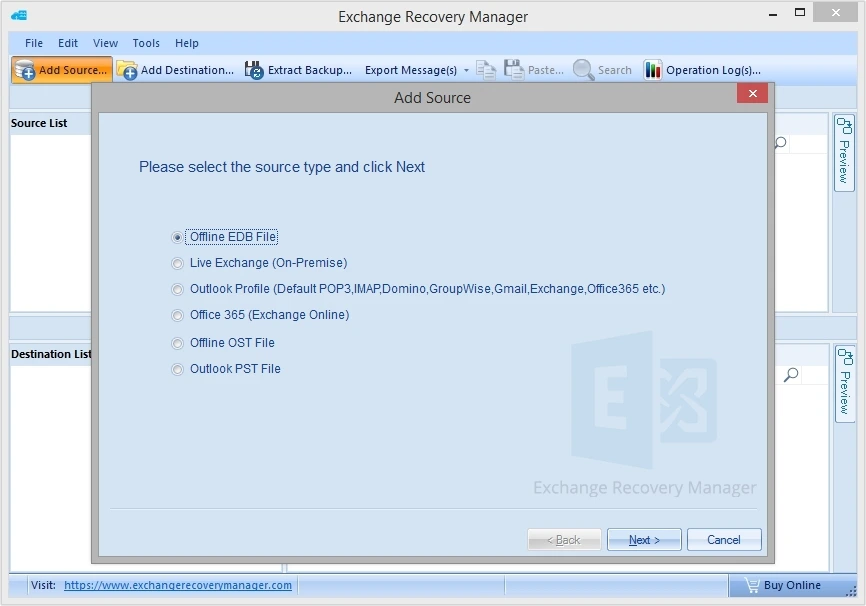
  • Step 2. Open the tool and click on Add Source > Offline EDB File > Next.
  • Step 3. Click Export Message(s), then select MSG, EML, HTML, RFT, etc. from the list.
  • Step 4. Select Target Folder, Save as format, and click OK.
  • Step 5. The software will begin the recovery process. Wait till it gets completed.
The software offers a free demo version which allows you to recover and save 25 items per folder for free.
Yes, you can recover offline EDB file of Exchange 2013 using this software. The tool is compatible with all versions of Exchange server such as Exchange 2019, 2016, 2013, 2010, etc.
Yes. The software provides multiple filters and allows you to recover selective Offline EDB mailboxes as per your choice.
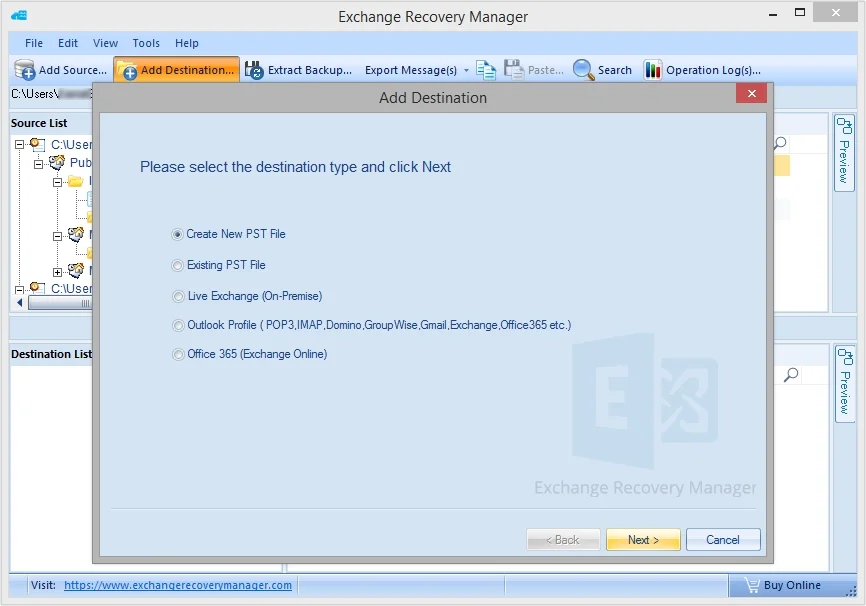
The software offers multiple outputs to save recovered EDB file data such as new or existing PST file, Live Exchange (On-Premises), Outlook Profile (POP3, IMAP, Domino, Group Wise, Exchange, Office 365, etc.), Office 365 (Exchange Online).
Yes, the software offers Extract Backup option to fetch raw data from Exchange backup files which you can use as the source file to recover and save data to the Exchange Server.
support@exchangeserverrecovery.com 1-866-348-7872