Home ❯ OST to PST Converter

OST to PST Converter

Best tool to convert OST files to PST, EML, MSG, or migrate to Office 365 & Exchange

  • Convert OST data, including emails, contacts, calendars, etc., to PST.
  • Migrate OST file data to Office 365 and Live Exchange.
  • Supports recovery of permanently deleted mailbox items.
  • Converts OST files of all Outlook, Exchange versions.
  • Access converted OST files in any version of Outlook.
  • Move mailbox data between different Outlook profiles on the same system.
  • Allows to encrypt the output PST file with a password.
Standard License
$599 $399
Buy Now
Professional License
$999 $799
Buy Now
Client Testimonials

Key Benefits of OST to PST Converter

Convert OST to PST

Convert OST to PST

This tool allows you to convert OST files to PST with complete data integrity. With the help of this tool, you can export OST file to a new PST file or an existing PST file. The tool supports saving data in UNICODE PST files too.

Export OST to Outlook profiles

Export OST to Outlook Profiles

With this software, you can move your OST file data to Outlook profiles (Default POP3, IMAP, Domino, GroupWise, Gmail, Exchange, & Office 365).

Recover mailboxes from OST files

Recover Mailboxes from OST Files

If you have orphaned OST files on user systems, then the Exchange OST to PST Converter can help you recover user mailboxes from OST files. It is capable of recovering all Exchange mailbox items from orphaned OST files.

Preview OST items before conversion

Preview OST items Before Conversion

The OST to PST converter allows you to preview recovered emails, attachments, and other items before saving to PST format. While previewing, you can verify that the data integrity is retained.

Migrate OST to Office 365 (Exchange Online)

Migrate OST to Office 365 (Exchange Online)

You can export OST emails and other data directly to Office 365 with the help of OST to PST Converter. Also, the process to save OST to Office 365 is very simple and intuitive.

Move OST Data to Exchange Server

Move OST Data to Exchange Server

If you want to restore the OST file data to Exchange Server, then you can easily restore it with OST to PST Converter (in any version of the Exchange Server).

Smart Filtering Options

Smart Filtering Options

The advanced filtering options of the tool allow you to convert your OST file data based on item type and date range. With these filters, you can convert selected emails to PST format.

Multiple Saving Options

Multiple Saving Options

The OST to PST Converter allows you to save individual emails to multiple formats like PST, MSG, EML, RTF, HTML, Text, PDF, DOC, and DOCX.

Search for Specific Messages

Search for Specific Messages

With the “Search” feature of this tool, you can quickly look for specific emails or messages in your OST file based on different search parameters, such as From, To, Subject, etc.

Preserves Folder Structure

Preserves Folder Structure

The Output PST file will have a similar folder structure to that of the source OST file from Outlook profile. Furthermore, you can choose to exclude specific folders and duplicate items.

Split PST File

Split PST File

Divide the resultant file into multiple smaller PSTs based on size. The advanced built in PST split feature allows you to avoid creating large PST files to minimize the risk of mailbox corruption.

Free OST to PST Converter

Free OST to PST Converter

The tool offers a free trial version that you can download and convert 25 items per folder from OST to PST. For unlimited mailbox conversion, you can upgrade the tool anytime with just a few clicks.

OST to PST Converter Software - Free vs Full Version

Features
Trial Version
Full Version
Convert Outlook OST to PST
Move OST files to Live Exchange or Office 365
Convert individual emails to MSG, EML, RTF, DOC, and other formats
Split PST feature to manage large mailboxes
Preview complete OST file data before conversion
Convert files of all Outlook/Exchange versions
Convert bulk OST data 25 items per folder No limitation
Download Free Trial Buy Now
X

OST to PST Converter Specifications

  • Pentium Class Processor
  • 2 GB RAM
  • 100 MB free space - for software installation
  • Windows 7/8/8.1/10
  • Windows Server 2000/2003/2008/2008R2/2012/2012R2/2016
  • MS Exchange Server - Exchange 2000/2003/2007/2010/2013/2016
  • MS Outlook - Outlook 2000/2003/2007/2010/2013/2016/2019/Office 365.
Prestigious Clients
Prestigious Clients

FAQs OST to PST Converter Software

The OST to PST Converter is a great tool that helps users convert OST files to PST without any data loss or interruption. If you still have some questions in mind, then check out these answers.

Buy Online
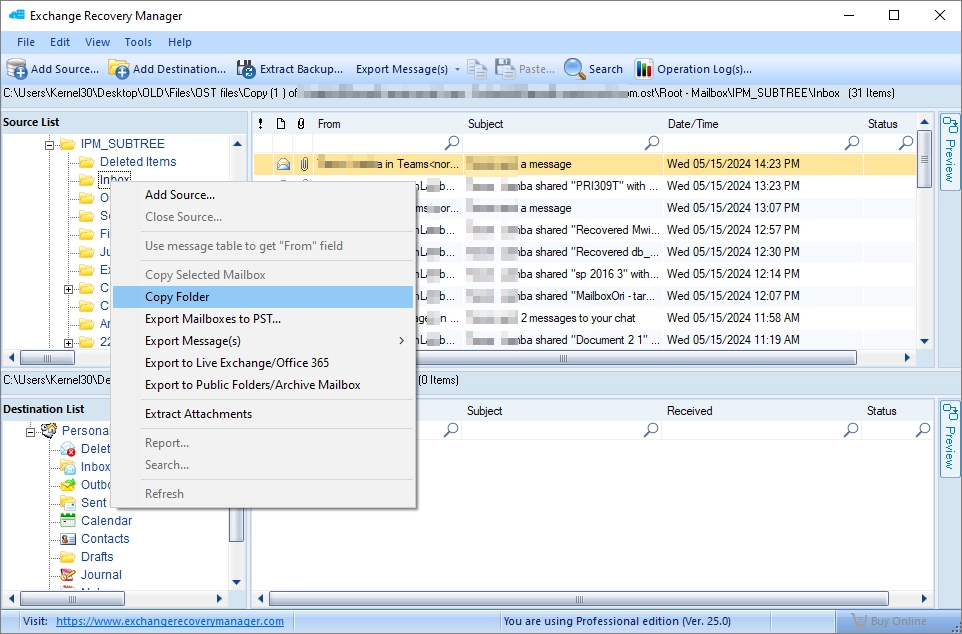
Here’s the simple step-by-step guide to convert bulk Outlook OST files and save them in a new PST:

Step 1: Download and install the OST to PST Converter.

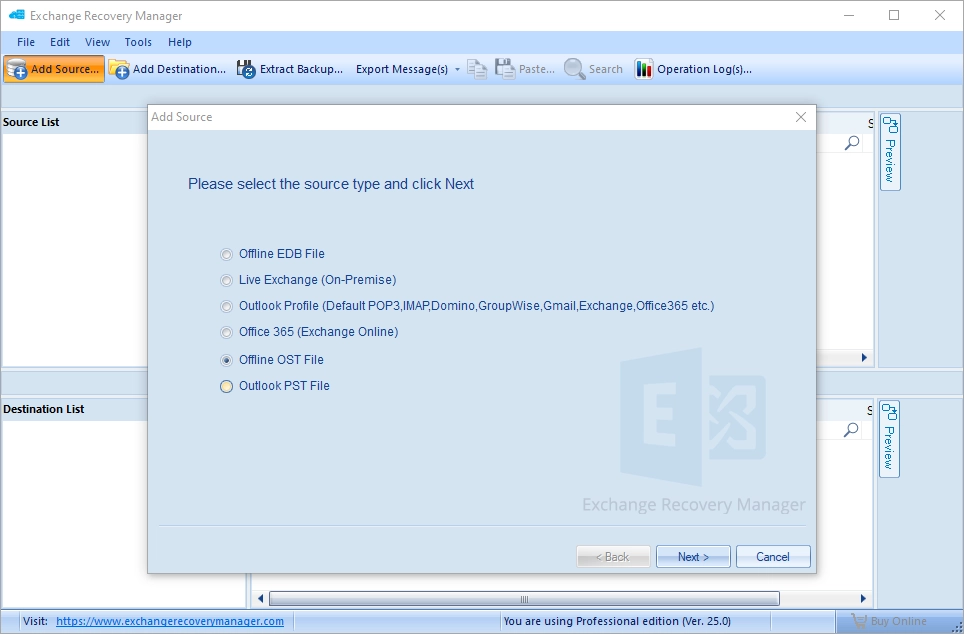
Step 2: Click Add Source, select Offline OST File option, and hit Next.

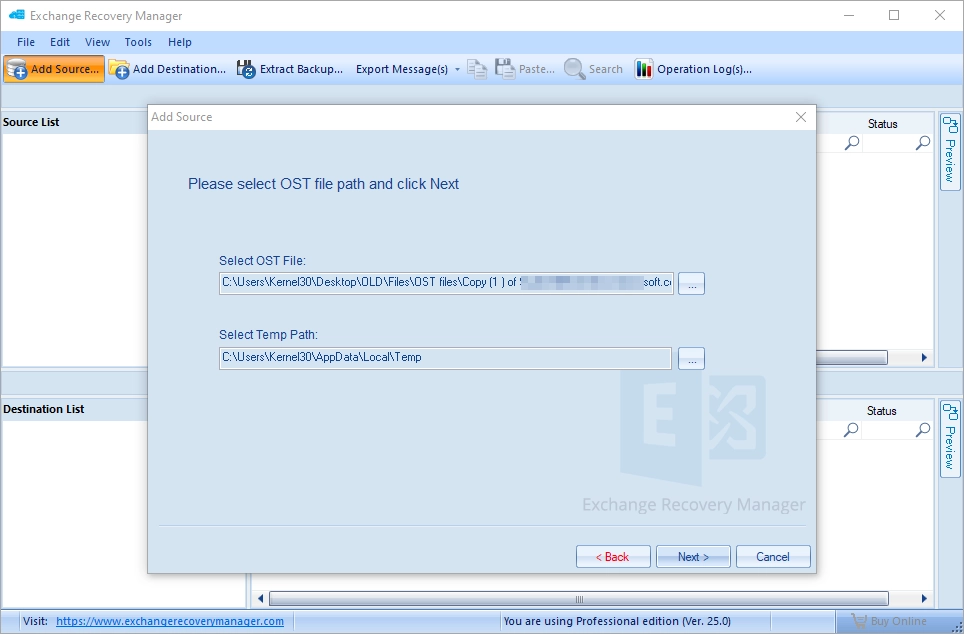
Step 3: Select the required OST files and click Next to proceed.

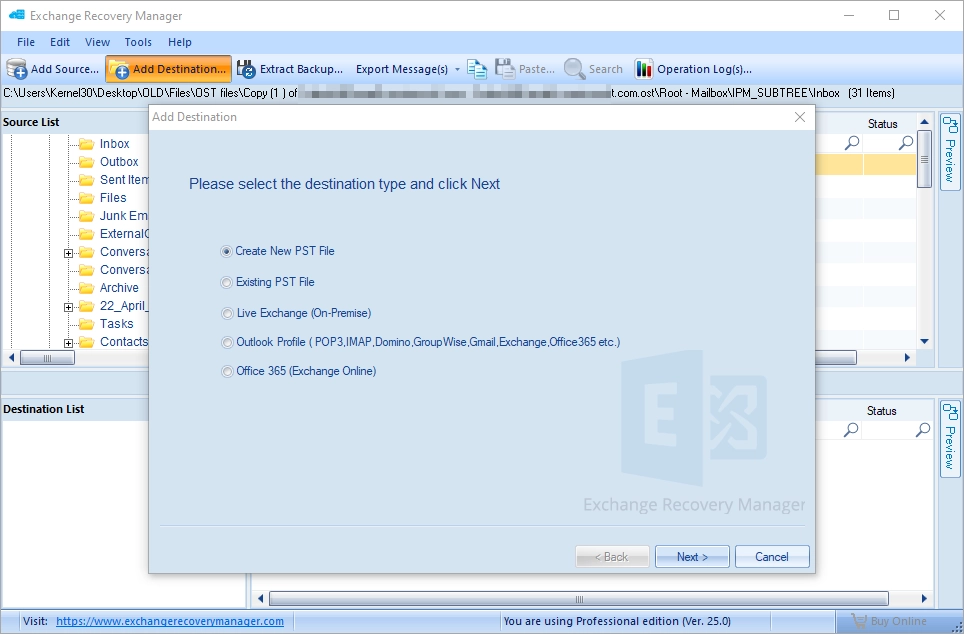
Step 4: Click Add Destination and select the option Create New PST file.

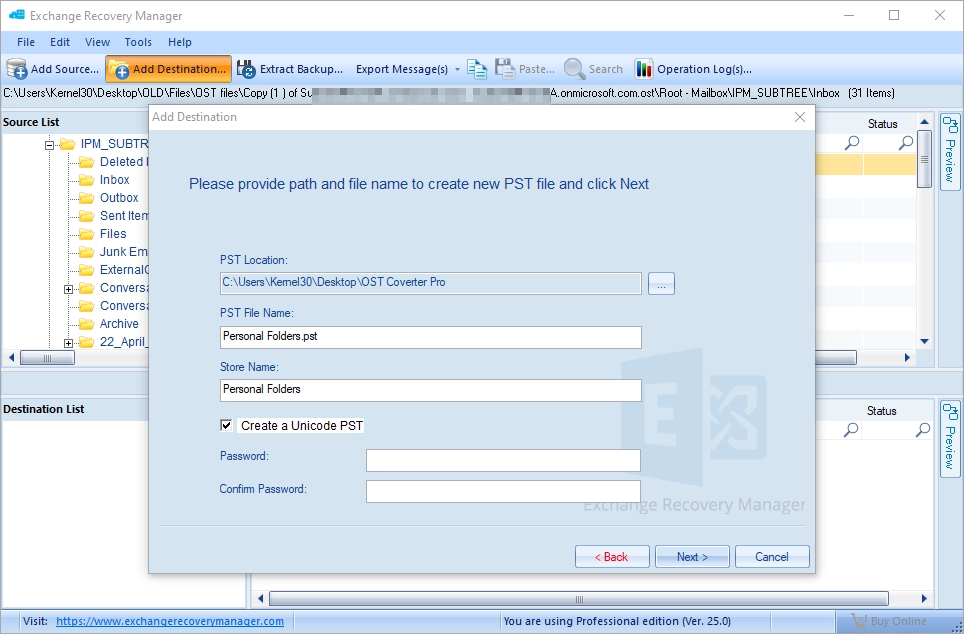
Step 5: Browse the location to save the converted files and click Next.

Step 6: Now, copy data from the source OST file to the destination PST file.

The trial version of the tool is free to download which allows you to convert only 25 items per folder.
Yes, with the Exchange OST to PST converter, you can move OST file data to an existing PST file.
Yes, if you only want to move the attachments of an OST, then it can be done with the Extract Attachments option.
With the OST to PST converter, you can save mailboxes to PST, Exchange, and Office 365. Furthermore, single emails can be exported to MSG, EML, PDF, DOC, HTML, Text, etc. formats.
Yes, this software is compatible with all versions of Exchange server, including Exchange 2019, 2016, 2013, 2010, etc.
support@exchangeserverrecovery.com 1-866-348-7872